TVGarden World Famelack TV
- 3.9
- Rating
- 500.00K
- Installs
- Free
- Price

 Analysis by App-foxy
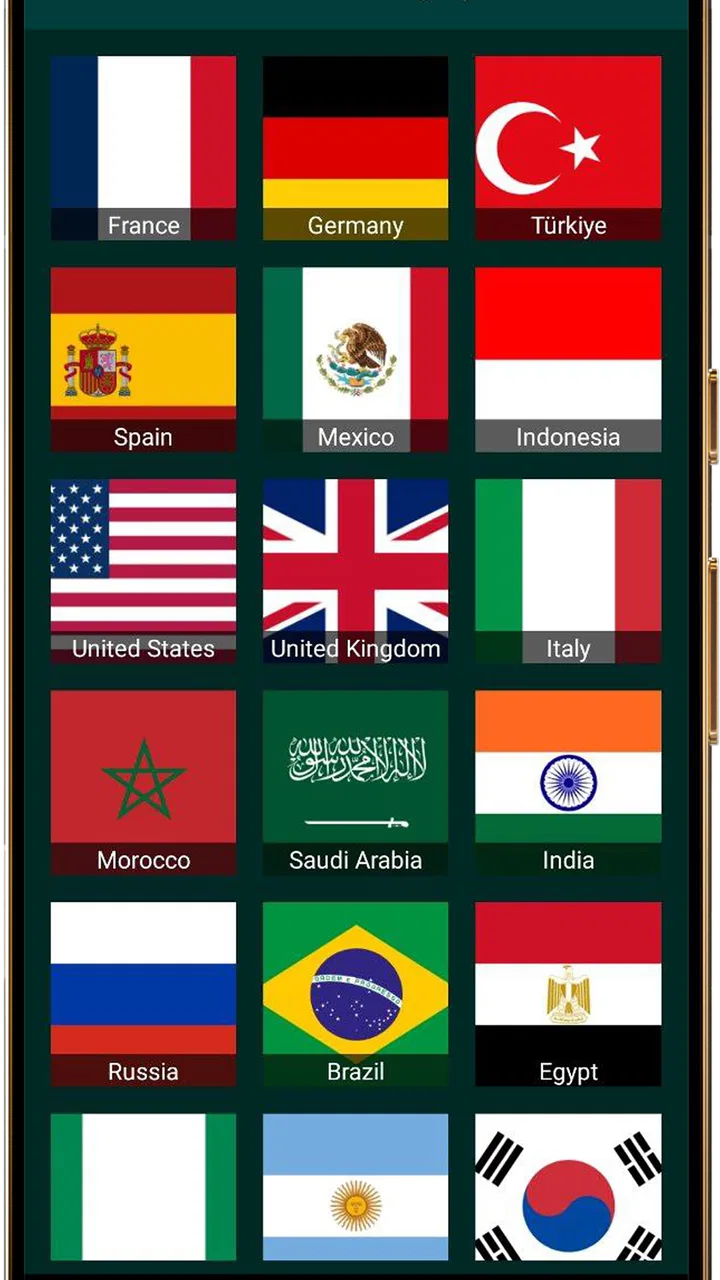
I found TV Garden World most interesting as a lightweight way to explore television streams from different places, rather than as a replacement for a full streaming subscription. Its appeal is immediate: open a map-like collection of channels, choose something that catches your attention, and let the app turn idle browsing into a small trip around the world. My overall view is positive but measured. It is best when curiosity matters more than a carefully organized watchlist.
That distinction is important because the app sits in the Events category while behaving primarily as a video player for your own TV streams. It is free, aimed at Everyone, and comes from FANNIA APPS. The current release is version 1.0.1, and it runs on Android 7.0 or later, which makes it accessible to people using older compatible devices as well as newer phones and tablets.
What using TV Garden World feels like
My first impression was that this is an app for browsing rather than planning. With services such as Netflix, YouTube, or a conventional television guide, I usually arrive with a specific intention: continue a series, search for a creator, or find a program at a particular time. Here, the more natural habit is to explore. I might start with one location, watch for a while, then switch to another region simply because the visual setting, language, or subject feels different.
You May Also Like

 Pandora - Music & Podcasts
Pandora’s Music Is Easy to Start, but Harder to Recover
Pandora’s strength is its low-effort path from a seed to a station. Its weak spot is how much confidence it asks you to place in connection, setup, and quiet recovery.

 8 Ball Pool
 Is Built on Rivalries, Rematches, and Routine
A close look at the rivalries, rematches, shared routines, and unanswered safety questions that turn a quick pool match into a persistent mobile community.

 Samsung Music
’s Quiet Strength Is Playing What You Already Own
Its reach comes less from spectacle than from dependable access to a personal library. That simplicity is both the app’s strongest retention engine and its ceiling.

 AccuWeather: Weather Radar
AccuWeather Review: A Quick, Clear Forecast for Everyday Decisions
For everyday plans, the best forecast is the one you can understand quickly. AccuWeather makes rain timing, radar, and local conditions easy to act on, with a few trade-offs.

 Hill Climb Racing
Why Hill Climb Racing Still Turns Crashes Into One More Run
A tiny car, a bumpy hill and one more upgrade: Hill Climb Racing keeps resurfacing because its simple chaos makes every near-miss feel personal.

 AliExpress - Shopping App
AliExpress Makes Global Shopping Feel Personal, but Shoppers Bear the Risk
AliExpress turns a global marketplace into a pocket-sized discovery engine. Its reach is useful, its shopping loop compelling, and its trade-offs easy to miss.
More From Our News Desk
View All News


That makes the experience surprisingly useful in small doses. It can fill a quiet breakfast, provide background viewing while I work on something simple, or give me a quick sense of what television looks like elsewhere. It is also a pleasant tool for language exposure. Even when I cannot follow every word, hearing different accents and seeing local presentation styles gives the viewing session more character than endlessly scrolling through familiar recommendations.
The app’s central idea is easy to understand, and that simplicity is one of its strongest qualities. I do not need to learn a complicated media library before trying it. The basic workflow is to explore the available world streams, select one, and judge quickly whether it is worth keeping on screen. That low commitment suits spontaneous viewing much better than apps built around long-term subscriptions and personalized profiles.
At the same time, I would not describe it as a polished replacement for a traditional live-TV package. The experience depends heavily on the individual stream. One channel may be engaging, while another may feel repetitive, unavailable, or unsuitable for the moment. The app gives me a doorway to streams, but the quality of what lies behind that doorway can vary. That is the main trade-off to understand before installing it.
A practical everyday scenario
Imagine that I am preparing dinner and want something moving on a nearby tablet without committing to a film. I can open TV Garden World, choose a stream that looks visually interesting, and let it play while I cook. If the content becomes distracting or unappealing, I can move on instead of spending ten minutes searching through a large catalog. This is where the app feels more useful than a conventional on-demand service: the decision is light, and discovery is part of the entertainment.
Another realistic use is a shared viewing session with friends or family. Rather than arguing over a familiar show, we can browse different locations and choose something that creates conversation. A local news format, a public event, or an unfamiliar cultural program can become a talking point even when nobody intends to watch for a long time. I would treat this as casual group discovery, not as a dependable source for a particular broadcast.
For language learners, I found a small but meaningful advantage in resisting the urge to switch immediately whenever a stream is difficult to understand. Keeping one channel on for several minutes lets me notice recurring words, presentation rhythms, and visual cues. The app is not a dedicated language-learning tool, so it does not provide lessons or structured exercises, but its international focus can make passive exposure easier to fit into daily life.
Where it stands against familiar alternatives
The closest alternatives depend on what I want from television. If I want a specific movie or series, an on-demand service is usually better because its search, recommendations, and playback expectations are clearer. If I want creator-led clips, YouTube offers a much broader range of content and more familiar discovery tools. If I want dependable local programming, an official broadcaster app or a regional live-TV service is likely the safer choice.
TV Garden World has a different strength: it makes geographic discovery the starting point. Instead of asking what title I want, it encourages me to ask what place or kind of broadcast I feel like seeing. That is a meaningful difference, not just a smaller catalog competing with larger platforms. The app is most enjoyable when I accept that the route is exploratory and that not every stop will be rewarding.
I also prefer it to ordinary channel surfing when I am specifically interested in international variety. Traditional television can offer many channels, but the selection is often tied to a provider, a region, or a paid package. This app gives the idea of global browsing a more direct role. The compromise is that I should not expect the same level of consistency, support, or editorial organization that comes with a major commercial service.
The strongest reasons to keep it installed
The first advantage is the low barrier to experimentation. Because the app is free, I can try it without making a subscription decision or building a household media plan around it. That matters for an app whose value is based on curiosity. I can use it occasionally and still feel that it has earned its place, rather than needing daily viewing to justify a recurring cost.
The second advantage is the way it changes the question of what to watch. I often spend too long comparing thumbnails when using large entertainment platforms. Here, the world-stream concept gives me a different starting point. I can choose by location, mood, or visual interest and accept a little uncertainty. That makes the app feel closer to digital wandering than to shopping for entertainment.
The third advantage is its usefulness on a secondary screen. A phone is fine for short exploration, but a tablet or another larger display makes the concept more comfortable. I can leave a stream visible while doing a low-focus task, then return to it when something interesting happens. I would avoid treating it as guaranteed background audio, though, because the content can change in ways that demand attention.
A less obvious benefit is that the app can help break habitual viewing patterns. When I use familiar services, their recommendations tend to lead me back toward subjects and formats I already know. A world-oriented player creates more room for accidental discovery. That does not mean every discovery will be good, but occasional unpredictability can be refreshing when algorithmic feeds begin to feel repetitive.
The friction that affects the verdict
The biggest weakness is not the concept; it is the uncertainty that comes with stream-based viewing. A channel may not match the title or location I expected, may be unavailable at a particular moment, or may simply have little that interests me. Since the app’s appeal depends on what each stream is showing, the quality of one session can be much better than the next.
This also means that people who need dependable scheduling should be cautious. If I am trying to watch a particular news bulletin, sports event, or program at a fixed time, I would choose an official source whenever possible. TV Garden World is better for browsing than for making a promise to myself that a specific broadcast will be ready when I arrive.
Another limitation is the lack of a strong reason to return for users who already have a carefully organized media routine. Someone who mainly watches saved series, paid channels, or a personal video library may find the exploratory approach less efficient. The app does not replace the comfort of pressing play on a known favorite. Its value appears when I want the opposite: something unfamiliar, loosely chosen, and connected to another part of the world.
I also think the experience benefits from realistic expectations about playback. A video player can make access feel simple, but the underlying stream still determines how smooth the session feels. Network conditions, the source itself, and the device being used can all influence the result. I would test it first on a stable connection and avoid judging the entire concept from one troublesome stream.
Small habits that make exploration better
I get more from the app when I begin with a clear but flexible purpose. For example, I might spend a few minutes looking for a stream from a country whose language I am hearing, or choose a location that fits the time of day. This is more satisfying than tapping randomly with no patience at all. The goal is not to find a perfect channel instantly; it is to give discovery enough room to work.
I also recommend treating each stream as a short trial before settling in. If the picture, subject, or presentation does not appeal to me, I move on quickly. That habit prevents the common mistake of assuming the entire app is disappointing because the first selection was weak. The app’s structure rewards sampling, and a little willingness to switch is part of using it well.
For shared use, I would let everyone choose a location in turn. That turns the app into a simple conversation starter rather than a passive screen. It works particularly well when the group is open to unfamiliar formats. If everyone wants a precise genre or a predictable family program, a conventional service will probably create less friction.
On a limited data plan, I would be sensible about longer sessions. Video can consume a meaningful amount of mobile data, so Wi-Fi is the practical choice when I plan to explore for a while. This is not a criticism unique to this app, but it matters here because the browsing style can make time disappear. A quick experiment can easily become an extended viewing session.
Who should try it, and who should skip it
I would recommend TV Garden World to curious viewers who enjoy international television, casual discovery, and the feeling of finding something without a detailed search. It is also a good fit for people who want a free companion app for spare moments, language exposure, or informal group browsing. The Everyone age rating makes it approachable for a broad audience, although individual streams should still be judged sensibly by the person using the device.
It may also suit travelers, expatriates, and people with family connections in other countries who want a simple way to explore television beyond their immediate region. I would not present it as a substitute for a dedicated service tied to one country, because reliability and program availability matter more in that situation than geographic variety.
I would skip it if my priority is a fixed channel lineup, a personal library, advanced search, or guaranteed access to one named program. I would also choose another option if I dislike browsing and want every minute of viewing to be predictable. The app asks me to tolerate a little uncertainty, and that is either its charm or its central inconvenience depending on my habits.
The public response suggests a mixed but interested audience: the app has an average rating of 3.5 from around 2 thousand ratings, with over 100 thousand installs. I read that as a sign that the concept attracts real curiosity while not delivering a uniformly perfect experience for everyone. The relatively small number of written reviews, around 11, also means I would rely more on my own short test than on star averages alone.
My final view after using it
TV Garden World is a focused idea with a clear personality. It does not win by having the biggest entertainment library or by replacing every other video service. It wins when I want to look outward, browse television from different places, and accept that discovery includes a few uninteresting stops. That makes it more distinctive than its simple player label might suggest.
FANNIA APPS has delivered something I can imagine opening for a short, low-pressure viewing session. The free access removes the main financial obstacle, the Android 7.0 minimum keeps it available to many older devices, and the straightforward concept is easy to explain to someone else. Still, I would keep an official broadcaster or mainstream streaming app nearby for reliable scheduled viewing and organized entertainment.
My recommendation is therefore specific: install it if you enjoy international discovery and want a casual way to explore your own TV streams. Do not install it expecting a complete television subscription, a guaranteed schedule, or a replacement for a polished on-demand catalog. As a free window into varied live viewing, it is worth trying; as your only television app, it is too unpredictable.
Released on September 28, 2025, and still at an early version stage, it feels like an app I would revisit when I want something different rather than something certain. That is a modest role, but a useful one. For the right viewer, the pleasure is not knowing exactly what comes next and finding a worthwhile stream along the way.
FAQs for TVGarden World Famelack TV
01What platforms is TV Garden World Video Player available on?
TV Garden World Video Player is available for both Android and iOS devices. Users can download the app from the Google Play Store for Android devices or the Apple App Store for iOS devices. It’s designed to work seamlessly across a variety of smartphones and tablets.
02What video formats does TV Garden World Video Player support?
TV Garden World Video Player supports a wide range of video formats, including MP4, AVI, MKV, and MOV. This ensures compatibility with most of the video files you might have, making it convenient for users who have diverse video libraries.
03Does TV Garden World Video Player offer offline viewing options?
Yes, TV Garden World Video Player allows users to download videos for offline viewing. This feature is particularly useful for those who want to watch videos without an internet connection, making it ideal for travel or areas with limited connectivity.
04Are there any in-app purchases or subscriptions required?
While TV Garden World Video Player is free to download, it offers optional in-app purchases. These include premium features such as an ad-free experience, additional customization options, and enhanced playback controls. Users can choose to purchase these for an improved experience.
05How does TV Garden World Video Player handle subtitles?
The app provides robust subtitle support, allowing users to upload their own subtitle files or choose from a selection available within the app. It supports various subtitle formats and offers customization options such as font size and color, ensuring an optimal viewing experience.
Pros
- User-friendly interface for easy navigation.
- Supports a wide range of video formats.
- Minimal buffering ensures smooth playback.
- Customizable settings enhance user experience.
- Free to download with no hidden fees.
Cons
- Contains ads that may interrupt viewing.
- Limited offline viewing options available.
- Occasional glitches with subtitle syncing.
- Requires regular updates for optimal performance.
- Some features locked behind in-app purchases.

TVGarden World Famelack TV
Gallery